From Brittle to Scalable: AWS Boosts VPC Perimeter Security with New IAM Keys


AWS has released three new IAM condition keys for VPC endpoints to strictly limit access by specific accounts, organizational units, or AWS Organizations. Learn how these keys help you build scalable security perimeters and reduce manual policy maintenance.
Key takeaways
- Simplify cloud perimeters with AWS: AWS IAM condition keys let you restrict access by account, organization, or OU without managing manual VPC lists.
- Scale guardrails: Combined with RCPs, these keys enable consistent, org-wide perimeter enforcement across accounts.
- Apply carefully: Support is limited to select services, so test thoroughly and include exceptions for AWS-managed access.
AWS announced recently the release of three identity and access management (IAM) condition keys for virtual private cloud (VPC) endpoints. These keys make it much easier to establish strong, scalable perimeters around your resources. With them, you can restrict access so that only requests coming from VPC endpoints in specific AWS accounts, organizational units (OU) paths, or AWS Organizations are allowed.
In this blog, we’ll explain how these keys can help you apply permissions perimeters at scale and reduce your attack surface without drowning in manual policy management.
Why perimeters around data matter
In traditional on-premises environments, the network perimeter was the main defense. In the cloud, that boundary has shifted, and identity has become the new perimeter. For sensitive data stored in assets such as S3 buckets, databases, and secrets, strong perimeters are essential. Often when misconfigured access causes breaches, it’s not because the hacked resources lack IAM, but because policies are too permissive.
Mastering identity and network perimeters in AWS can drastically reduce exposure. The trick is applying them consistently, at scale.
Guardrails in AWS
AWS provides multiple layers of controls, such as:
- Resource-based policies: Controls enforced directly at the resource (e.g., bucket policies)
- Service control policies (SCPs): Organizational guardrails for what accounts or OUs can do
- Resource control policies (RCPs): Fine-grained policies across multiple accounts
- Permission boundary: Permissions guardrails to limit specific IAM entities
Together, these guardrails help you enforce least privilege while keeping control centralized.
VPC endpoints as a building block
A VPC endpoint lets resources within your VPC reach AWS services directly, without traversing the public internet. On top of other benefits of this configuration, requests through endpoints carry condition keys such as aws:SourceVpc, which help identify the source of the request. This allows you to create policies that enforce the simple yet effective rule of: “Only allow this bucket to be accessed from this VPC.”
For example, you can use a Condition element with this key to create exceptions for requests coming from certain VPCs. The following policy taken from the AWS security blog illustrates this. (We have bolded part of the code for emphasis.)

Using a policy like this one helps ensure requests flow through known, private channels. But until now, scaling these controls across accounts and organizations was a tedious manual process.
The challenge of scale
So let’s say you don’t want to just limit access from a single VPC, but from all VPCs of a certain AWS account, or from several accounts, or even from your entire AWS organization. If you wanted to do this, you would have had to:
- Manually list every VPC ID in the relevant accounts.
- Update the list whenever VPCs were added or removed.
- Manage separate policies per account.
This doesn’t scale. It’s error-prone, brittle, and a nightmare to maintain across dozens of accounts.
Condition keys
AWS has now introduced three global condition keys to simplify this:
- aws:VpceAccount: The AWS account that owns the VPC endpoint
- aws:VpceOrgID: The AWS Organizations ID of the endpoint’s owning account
- aws:VpceOrgPaths: The OU path(s) that the endpoint’s account belongs to
With these, you can create simple conditions that scale naturally.
Let’s explore another example taken from the AWS security blog. (Again, we have bolded part of the policy for emphasis.)
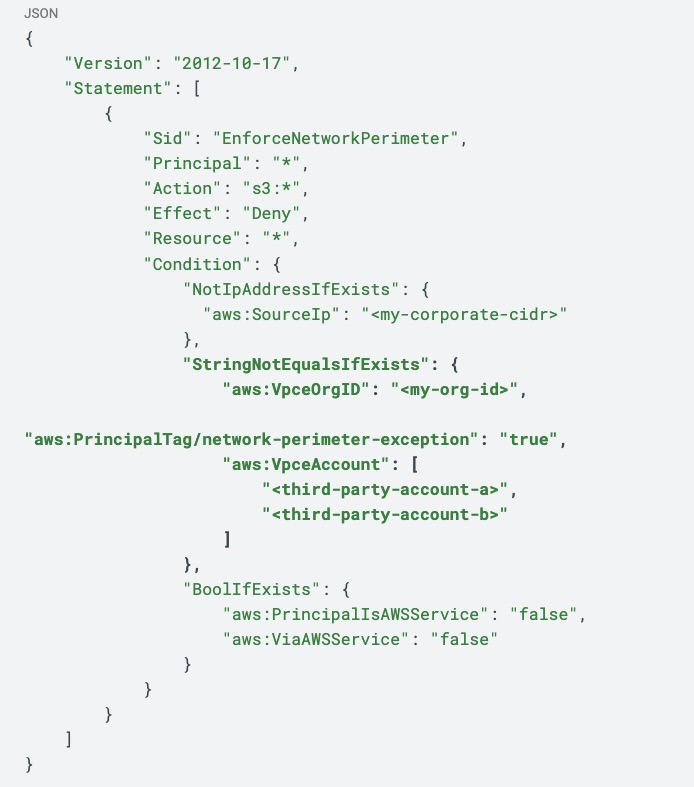
The section in bold shows an exception for:
- Requests coming from VPC endpoints within the customer’s organization, using the aws:VpceOrgID condition key
- Requests coming from VPC endpoints in allowed third party accounts, using the aws:VpceAccount condition key
- AWS services using specific service roles to access your resources, with the aws:PrincipalTag/network-perimeter-exception set to true
If you wish to further generalize the use of the aws:VpceAccount condition key, you can use it with this syntax …
"aws:VpceAccount": "${aws:ResourceAccount}"… which matches the account ID of the VPC endpoint with the account ID of the resource being accessed (as specified here) - if you want for the policy to only allow same-account access.
And as exemplified here, you can use the aws:VpceOrgPaths condition key to create this exception for VPC endpoints in accounts that belong in a certain OU path within the organization.
Scaling with RCPs
By using these keys inside resource control policies, you can enforce guardrails across dozens or hundreds of accounts without writing separate policies for each one.
For example:
- Require all S3 buckets in an OU to only accept traffic from VPC endpoints owned by accounts in that OU.
- Block endpoints in “sandbox” OUs from accessing production data.
This moves perimeter enforcement from a manual, bucket-by-bucket exercise into a scalable org-wide control.
Testing and caveats
Remember that support coverage for these condition keys is only for certain services at launch, including S3, DynamoDB, Key Management Service, and Security Token Service. Check the AWS documentation for the latest availability.
As always, use caution when applying guardrails, especially ones that apply across entire accounts such as resource control policies.
Note for example that some AWS-managed services such as CloudTrail and Config may need access to your resources. So, as we’ve previously discussed on our blog and also as you may note in the example policies AWS shared on its blog, it’s wise to understand condition keys such as aws:PrincipalIsAWSService and aws:ViaAWSService to create exceptions for those as well.
And of course, before you move anything to a higher environment, such as production, always test thoroughly and rigorously in a non-production environment, and make sure no legitimate business functionality is being compromised due to the guardrails.
Conclusion
With aws:VpceAccount, aws:VpceOrgID, and aws:VpceOrgPaths keys, AWS has taken a big step toward elegant, scalable perimeters around cloud resources. Instead of brittle, manually maintained lists of VPC IDs, you can now express intent directly: “only from this account,” “only from this org,” or “only from these OUs.”
Combined with RCPs, this gives security teams powerful levers to enforce least privilege across fleets of accounts. The key is to test carefully, account for AWS service access, and roll out the condition keys incrementally. Done right, these condition keys make identity truly the perimeter — and make that perimeter enforceable at scale.
If you want to learn more about this particular feature, you can get more details in the AWS documentation “AWS global condition context keys” and in the AWS blog “Use scalable controls to help prevent access from unexpected networks.”
If you have any specific questions about this AWS feature or about our cloud security solution Tenable Cloud Security, you’re welcome to reach out.
Learn more
Tenable One
Request a demo
The world’s leading AI-powered exposure management platform.
Thank You
Thank you for your interest in Tenable One.
A representative will be in touch soon.
Form ID: 7469
Form Name: one-eval
Form Class: c-form form-panel__global-form c-form--mkto js-mkto-no-css js-form-hanging-label c-form--hide-comments
Form Wrapper ID: one-eval-form-wrapper
Confirmation Class: one-eval-confirmform-modal
Simulate Success