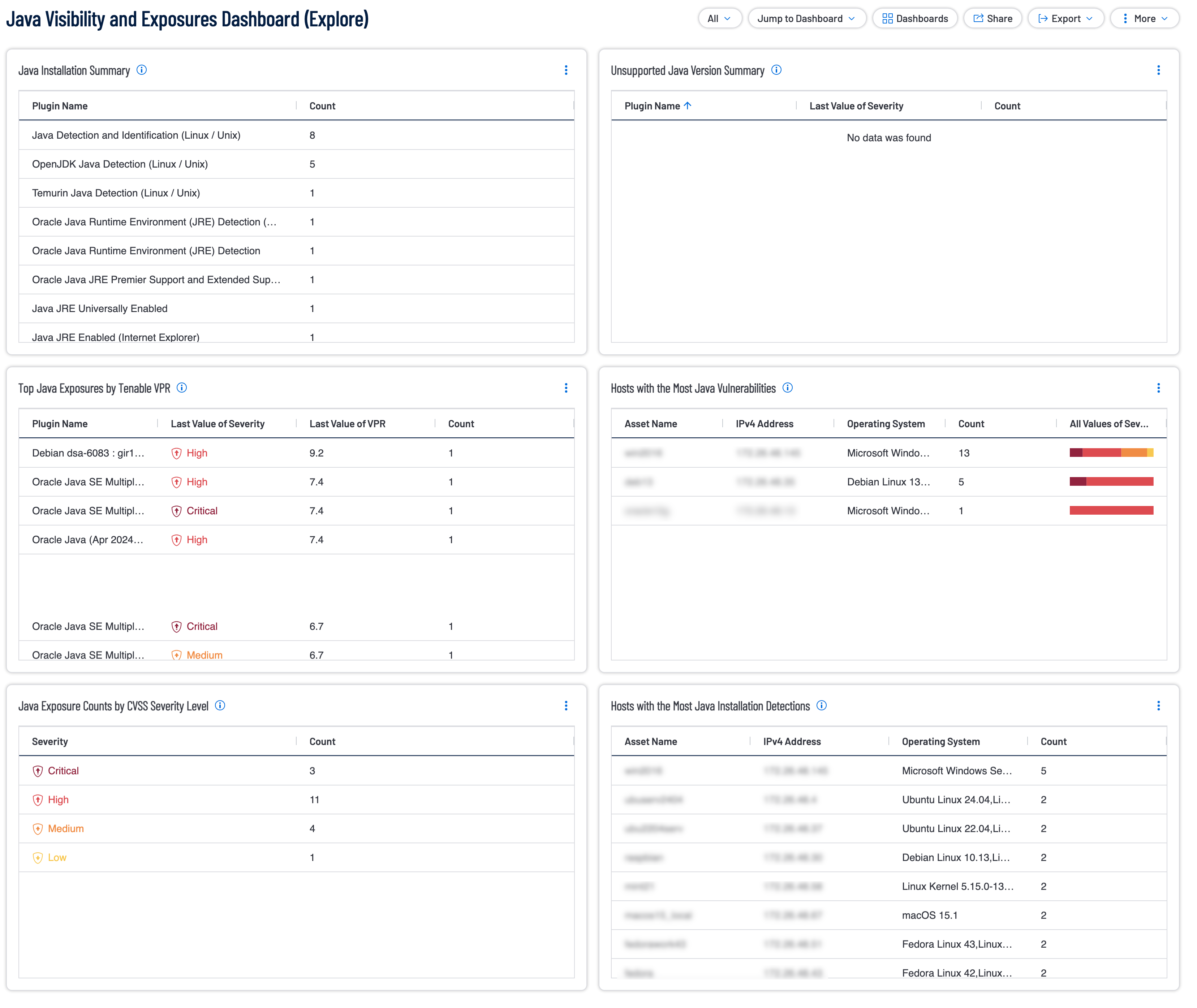
Securing the Java stack is more than a simple patch management exercise. Java vulnerabilities ranging from legacy JRE flaws to modern library exploits like Log4Shell can grant adversaries deep access to internal networks. As organizations integrate Agentic AI and GenAI, the stakes are even higher. AI agents often operate with significant autonomy and rely on Java backends. A compromised Java instance can allow an attacker to leverage low-and-slow attacks or prompt-injection crescendo attacks to gain access to sensitive data via these automated agents.
Designed with the principles of the Cyber Exposure Lifecycle in mind, this dashboard allows teams to detect, predict, and act on Java risks with high precision. To ensure maximum accuracy, these widgets rely on successful Local Checks performed via the Tenable Agent or credentialed scanning. Across all widgets, a rigorous filtering logic is applied to maintain a constant focus on actionable data. This is achieved through targeted identification that filters for the string "Java" within the Plugin Name, combined with a temporal check that only displays active detections seen within the last 30 days. Furthermore, the dashboard maintains a view of active risk only by excluding any vulnerabilities with a State of "Fixed" or a Risk Modified status of "Accepted." An impact focus filter also removes Informational results to prioritize Low through Critical severities.
This dashboard provides a comprehensive, risk-based view of the Java ecosystem across the scanned environment. In the modern enterprise, the Java Runtime Environment is both a foundational utility and a primary attack vector. This dashboard also empowers security and application teams to move beyond checking a box for compliance. By presenting findings in a manner that focuses on the most significant vulnerabilities first, remediation becomes more efficient, the attack surface is reduced, and progress can be visually tracked against established security goals. The requirement for this dashboard is: Tenable Vulnerability Management (Nessus).
Widgets
Java Installation Summary: This widget provides visibility into where Java applications are installed across the environment that the user has scanned with Tenable. The user will want to have current Local Check enabled with the Tenable Agent or successful Credentialed scanning. This widget provides plugin names and their counts by using the Plugin Name filter set to find all plugins that include the word java. The widget also uses the Last Seen, Severity, State, and Risk Modified filters to only show the non-informational severity plugins last seen within 30 days which are not Fixed nor have their risk set to Accepted. The widget is sorted by count to show the most prevalent plugin at the top. The requirement for this widget is: Tenable Vulnerability Management (Nessus).
Unsupported Java Version Summary: This widget provides visibility into the unsupported versions of Java across the environment. The widget provides plugin names and their counts by using the Plugin Name filter set to find all plugins that include the word java and either unsupported or SEOL. The widget also uses the Last Seen, Severity, State, and Risk Modified filters to only show the non-informational severity plugins last seen within 30 days which are not Fixed nor have their risk set to Accepted. The widget is sorted by count to show the most prevalent plugin at the top. The requirement for this widget is: Tenable Vulnerability Management (Nessus).
Top Java Exposures by Tenable VPR: This widget reports on all Java vulnerabilities uncovered across the environment. Having successful Local Check scan results on these assets with either the Tenable Agent or a successful Credentialed scan is imperative to ensure this widget displays the most accurate data. This widget provides plugin names, their severities, VPR and their counts by using the Plugin Name filter set to find all plugins that include the word java. The widget also uses the Last Seen, Severity, State, and Risk Modified filters to only show the non-informational severity plugins last seen within 30 days which are not Fixed nor have their risk set to Accepted. The widget is sorted by Last Value of VPR score in descending order. The requirement for this widget is: Tenable Vulnerability Management (Nessus).
Hosts with the Most Java Vulnerabilities: These are the hosts that have the most Java vulnerabilities with the worst asset in this category at the top of the list. This widget provides Asset Names, their IP Addresses, Their Operating System, their counts, and all their severity values by using the Plugin Name filter set to find all plugins that include the word java. The widget also uses the Last Seen, Severity, State, and Risk Modified filters to only show the non-informational severity plugins last seen within 30 days which are not Fixed nor have their risk set to Accepted. Hovering over the severity bar displays a breakdown of how many of each severity was detected. The widget is sorted by count to show the asset with the most detected java plugins at the top. The requirement for this widget is: Tenable Vulnerability Management (Nessus).
Java Exposure Counts by CVSS Severity Level: Java Exposure Counts per CVSS Severity Level widget displays a severity breakdown of the detected Java plugins across the scanned environment. This widget provides Severity Counts of all detected plugins that include the word java in the name. The widget also uses the Last Seen, Severity, State, and Risk Modified filters to only show the non-informational severity plugins last seen within 30 days which are not Fixed nor have their risk set to Accepted. The requirement for this widget is: Tenable Vulnerability Management (Nessus).
Hosts with the Most Java Installation Detections: This table displays the hosts with the most java installation detections across the scanned environment. This widget provides Asset Names, their IP Addresses, Their Operating System, and their counts by using the Plugin Name filter set to find all plugins that include the word java. The widget also uses the Last Seen, Severity, State, and Risk Modified filters to only show the non-informational severity plugins last seen within 30 days which are not Fixed nor have their risk set to Accepted. The widget is sorted by count to show the asset with the most detected java plugins at the top. The requirement for this widget is: Tenable Vulnerability Management (Nessus).
Tenable One
Request a demo
The world’s leading AI-powered exposure management platform.
Thank You
Thank you for your interest in Tenable One.
A representative will be in touch soon.
Form ID: 7469
Form Name: one-eval
Form Class: c-form form-panel__global-form c-form--mkto js-mkto-no-css js-form-hanging-label c-form--hide-comments
Form Wrapper ID: one-eval-form-wrapper
Confirmation Class: one-eval-confirmform-modal
Simulate Success